
Free SEO Content Planner Tool for Bloggers & Content Creators
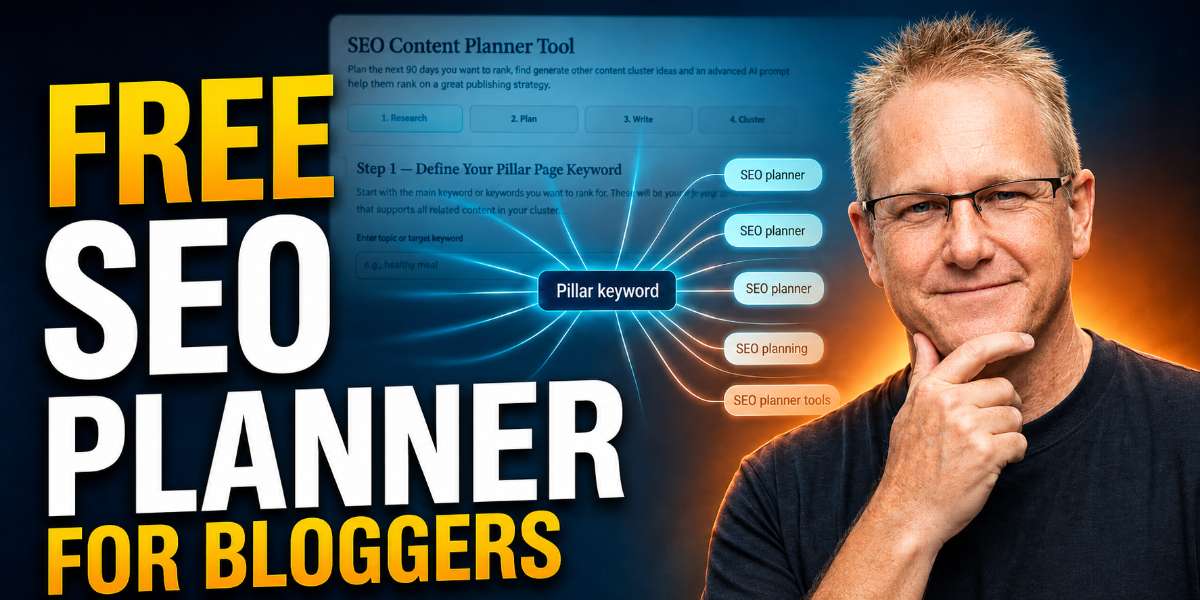
The free SEO content planner tool below helps bloggers, content creators, affiliate marketers, and small website owners turn one topic, keyword, product, or niche idea into a practical SEO publishing plan.
Instead of staring at a blank screen wondering what to write next, use the tool to generate keyword angles, SEO titles, meta descriptions, supporting blog post ideas, and content cluster direction before you start writing.
Enter your topic below, create your plan, then use the guide underneath the tool to turn that output into a stronger blog post, content cluster, or YouTube-to-blog workflow.

SEO Content Planner Tool
Plan the main SEO page you want to rank, then generate starter content cluster ideas and an advanced AI prompt to turn those ideas into a proper publishing strategy.
Step 1 — Define Your Pillar Page Keyword
Start with the main topic, product, tool, or keyword you want your pillar page, tool page, or main article to rank for. The suggestions below help you choose the strongest primary angle.
Recommended primary keyword angles
Question and beginner intent angles
Comparison and commercial intent angles
Step 2 — Choose Page Type & SEO Title
This title is for the main page you want to rank. For tool pages and pillar pages, lead with clarity first, then add the click hook.
This browser-based planner can help you brainstorm SEO titles, but some keywords may create awkward or overly literal suggestions. If a title does not sound natural, does not match your article angle, or simply feels wrong, edit it manually before locking it in.
You can also ask AI to create a better SEO title based on your keyword, topic, and search intent, then paste your preferred version here. Manual edits are fine and will not break the rest of the planner.
Step 3 — Generate Meta Description
This meta description is for the main pillar page only. It should include the keyword, explain the benefit, and sell the click.
This tool can suggest useful starting points, but some meta descriptions may not perfectly match your keyword, title, or article angle. If the description sounds awkward, too generic, or not quite right, ask AI to rewrite it or enter your own version manually.
A clear, human-edited meta description is usually better than forcing a generated one that does not fit. Changing the meta description manually will not affect your content ideas, cluster suggestions, or final AI prompt.
Step 4 — Generate Starter Content Cluster Ideas
These are starter supporting article ideas designed to help the main page rank. They are raw inputs for the AI strategy prompt, not final publishing instructions yet.
Step 5 — Copy Your AI Cluster Strategy Prompt
Your pillar page plan and starter cluster ideas are ready. Copy the AI prompt into ChatGPT, Claude, Gemini, or your preferred AI tool to turn the starter ideas into a refined SEO publishing strategy.
Selected Pillar Keyword
Page Type
SEO Title
Meta Description
Pillar Page Plan
Advanced AI Cluster Strategy Prompt
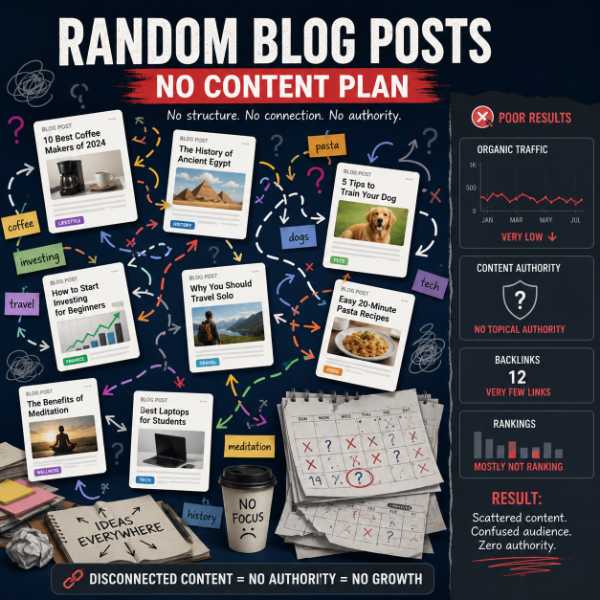
Random blog posts usually create random results.
One article here, one article there, a half-finished idea from last month, and a few AI-generated drafts with no structure can make your blog feel busy without actually building authority.
A better approach is to plan content around a central topic. That means choosing one main page, creating supporting articles around it, linking those articles together, and making sure each post targets a different search intent.
That is how you move from scattered content to a structured SEO content plan.
How to Use SEO Content Planner Explanation Video
How to Use The SEO Content Planner Tool - Step by Step Tutorial
Use the tool above to enter your main topic, niche, keyword, product, service, or content idea. The planner will help you turn that idea into a more organized SEO content plan.
You can use it to plan blog post ideas, keyword angles, SEO title ideas, meta descriptions, supporting articles, internal links, content clusters, and publishing direction.
This tool is especially useful when you already have an idea but do not know how to turn it into a full content strategy.
For example, you might start with a simple idea like:
- QR code generator
- image compressor
- affiliate marketing for beginners
- blog content planning
- YouTube script writing
- healthy weight loss
- digital nomad lifestyle
- frequency therapy
A weak content strategy would turn that idea into one random blog post and hope for the best.
A stronger strategy turns that idea into a main page, several supporting posts, related FAQs, internal links, and a publishing order that makes sense.
That is the difference between publishing content and building a content system.
📢 Shareable Insight
“Planning your content first makes blogging easier. You stop guessing, start seeing the next step, and waste less time creating posts that do not fit together.”
👉 Click to Tweet
What This SEO Content Planner Tool Helps You Create
A good SEO content planner should not just give you a pile of random titles. You need ideas that fit together.
This tool can help you create:
- Keyword ideas: These help you find different search angles around your main topic. Instead of only targeting a broad phrase like “SEO,” you might find more useful angles such as “SEO content planning for beginners,” “how to build a content cluster,” or “how to avoid keyword cannibalization.”
- SEO titles: These help you turn a keyword or topic into a clickable blog post title. A good title should include the topic naturally, match the reader’s intent, and give people a reason to click.
- Meta descriptions: These help you write a short search result summary that explains why someone should visit your page. A clear meta description can improve the way your article appears in search results and make the page feel more relevant.
- Supporting blog post ideas: These help you build content around a main page. Instead of writing one article and stopping, you can create related guides, tutorials, checklists, comparisons, and FAQs that support the main topic.
- Content cluster structure: These ideas help you decide which page should be the main hub and which posts should support it. This makes your blog easier for readers and search engines to understand.
- Publishing strategy: This helps you think about what to publish first, what to publish next, and how each article connects to the wider content plan.
Problem
Random blog posts usually create random results.
One article here, one article there, a half-finished idea from last month, and a few AI-generated drafts with no structure can make your blog feel busy without actually building authority.
A better approach is to plan content around a central topic. That means choosing one main page, creating supporting articles around it, linking those articles together, and making sure each post targets a different search intent.
That is how you move from scattered content to a structured SEO content plan.
Step 1: Enter Your Main Topic or Keyword
Start with one main idea.
This could be:
- a keyword
- a niche
- a product
- a service
- a blog category
- a YouTube video idea
- a customer problem
- a question your audience asks
Examples include:
- QR code generator
- blog content planner
- image compressor
- affiliate marketing for beginners
- how to write YouTube scripts
- healthy meal planning
- digital nomad budget
Do not worry if your first idea feels broad.
The goal is to use the tool to break that idea into clearer angles.
For example, “blogging” is too broad on its own. It could mean starting a blog, writing blog posts, making money blogging, blog SEO, blog design, blog tools, or blog promotion.
But if you enter a broad topic like “blogging,” the planner can help you narrow it into more useful angles such as:
- blog content planning
- blog post ideas for beginners
- how to create a content calendar
- how to write SEO titles
- how to build a blog content cluster
- how to use internal links in blog posts
That gives you a stronger starting point.
Instead of writing one vague article about blogging, you can start building a proper content roadmap.
Step 2: Review the Keyword and Content Angles
Once the tool gives you ideas, do not blindly turn every idea into a blog post.
First, look at the intent behind each idea.
Ask yourself:
- Is this a beginner education topic?
- Is this a step-by-step tutorial?
- Is this a comparison?
- Is this a template?
- Is this a checklist?
- Is this a tool page?
- Is this a product review?
- Is this a problem-solving article?
- Is this a supporting FAQ?
- Is this too similar to another idea?
This step matters because two keywords can look different but mean almost the same thing.
For example, these phrases are slightly different:
- SEO content planner tool
- free SEO content planner tool
- SEO content planning tool
- blog SEO planner tool
However, they probably belong on the same main tool page because the search intent is similar.
You probably do not need four separate posts for those phrases.
On the other hand, these ideas target different problems:
- how to avoid keyword cannibalization
- how to create an SEO content calendar
- what is an SEO content plan
- how to write SEO titles
- how to turn one keyword into a content cluster
Because each idea answers a different question, those topics can become separate supporting posts.
That distinction matters. Instead of creating a new post just because the wording looks slightly different, create a new post only when the search intent is different.
Step 3: Choose Your Main Page or Pillar Page
Every content cluster needs a centre.
That centre might be:
- a free tool page
- a beginner guide
- a product review
- a comparison article
- a service page
- a category hub
- a pillar post
For this page, the centre is the free SEO content planner tool.
That means this page should own the core keyword.
Supporting articles should not try to outrank this page for the exact same phrase. Instead, they should target related problems.
For example:
Main page:
- Free SEO Content Planner Tool for Bloggers & Content Creators
Supporting post ideas:
- What Is an SEO Content Plan?
- How to Use an SEO Content Planner to Build a 10-Post Blog Cluster
- How to Turn One Keyword Into a Full Content Cluster
- How to Avoid Keyword Cannibalization on Your Blog
- SEO Content Brief Template: What to Include Before Writing
- How Internal Linking Builds Topical Authority Faster
That structure makes sense because each supporting post has a different job.
The main page gives people the tool.
The support articles explain the strategy, workflow, and common problems around the tool.
Step 4: Build Supporting Blog Post Ideas
Supporting posts should answer related questions that do not belong fully on the main page.
A good supporting post usually has a specific job.
Beginner Guides
A beginner guide explains a concept in plain English.
Example:
“What Is an SEO Content Plan? Beginner Guide for Bloggers”
This type of article helps readers understand the topic before they use the tool.
For example, beginner guides work well when your audience understands the problem but does not yet know the language around it. They might know they need “better blog ideas,” but they may not understand terms like content cluster, search intent, topical authority, or keyword cannibalization.
A beginner guide bridges that gap.
Tutorials
A tutorial shows the reader how to do something step by step.
Example:
“How to Use an SEO Content Planner to Build a 10-Post Blog Cluster”
This type of article helps readers get more value from the tool.
Tutorials work well because people often want to see the process in action. They do not just want theory. They want to know what to type, what to choose, what to ignore, and what to do next.
Checklists
A checklist helps readers avoid missing important steps.
Example:
“SEO Content Brief Checklist: What to Do Before You Write”
This type of article can attract people looking for a practical workflow.
A checklist is useful when the reader already understands the topic but needs a simple process to follow.
Problem-Solving Articles
A problem-solving article targets a mistake, frustration, or obstacle.
Example:
“How to Avoid Keyword Cannibalization on Your Blog”
This type of article works well because it connects planning to a real SEO problem.
Problem-solving articles are often strong support posts because they meet the reader at a pain point. The reader may not care about “content strategy” yet, but they do care if their posts are not ranking or if their own articles are competing with each other.
Templates
A template gives readers something they can copy or follow.
Example:
“SEO Content Brief Template: What to Include Before Writing a Blog Post”
Templates are useful because they reduce friction.
Instead of explaining the theory of content briefs for 3,000 words, a template gives the reader a structure they can use immediately.
Comparisons
A comparison helps readers choose between options.
Example:
“Free vs Paid SEO Tools: Do You Need Expensive SEO Software to Rank?”
This type of article can position your free workflow honestly without pretending paid tools have no value.
Comparison posts work well when readers are deciding whether they need a tool, software product, template, service, or workflow.
Step 5: Create SEO Titles and Meta Descriptions
The tool can help you create title and meta description ideas, but you should still edit them.
A good SEO title should:
- include the main keyword naturally
- match the reader’s search intent
- give a clear benefit
- avoid sounding robotic
- avoid fake urgency
- fit the actual article
For example, a weak title might be:
“SEO Content Planner Tool Information”
A stronger title would be:
“Free SEO Content Planner Tool for Bloggers & Content Creators”
The stronger version tells people exactly what the page offers and who it is for.
Your meta description should also be clear and useful.
A good meta description should:
- summarise the page clearly
- include the topic naturally
- give people a reason to click
- avoid keyword stuffing
- stay focused on the page
For example:
“Free SEO content planner tool for bloggers and content creators. Generate keyword ideas, SEO titles, meta descriptions, and content cluster plans.”
That works because it is simple, clear, and specific.
It tells the reader what the page is, who it is for, and what they can create.
Step 6: Plan Internal Links Before Publishing
Do not wait until months later to think about internal links.
Plan them before you publish.
A simple internal linking structure might look like this:
- The main tool page links to the supporting guides.
- Each supporting guide links back to the tool page.
- Related supporting guides link to each other.
- Tutorial posts link to tools.
- Template posts link to examples.
- Beginner guides link to deeper strategy articles.
For example, a post about keyword cannibalization could naturally link to:
- the SEO Content Planner Tool
- a keyword mapping guide
- an internal linking guide
- a content cluster guide
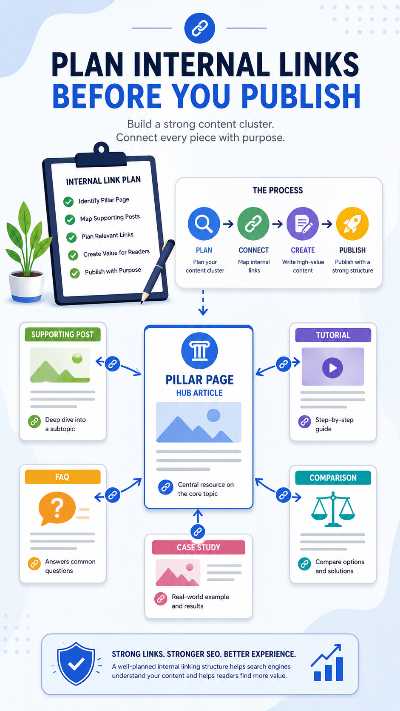
That helps readers move through your site naturally.
It also helps search engines understand how your content connects.
Who This Free SEO Content Planner Is For
This free SEO content planner is for people who want a clearer way to plan content before writing.
You do not need to be an advanced SEO expert to use it.
In fact, the tool is probably most useful if you are still learning how blog SEO fits together.
Beginner Bloggers
Beginner bloggers often make the same mistake.
They write whatever comes to mind.
That might feel productive at first, but it usually creates a scattered blog.
One post targets a broad keyword. Another post overlaps with the first one. Another post has no clear search intent. Then another post never links to anything else.
After a while, the blog has content, but it does not have structure.
This planner helps beginner bloggers slow down and think through the bigger picture before writing.
Instead of asking, “What should I write today?” you can ask, “What topic am I building authority around, and what does this post need to do?”
That small shift makes a big difference.
Content Creators
Content creators can use this planner to turn one idea into multiple pieces of content.
For example, one keyword could become:
- a blog post
- a YouTube video
- a short-form video
- an email
- a social media post
- a quote graphic
- a supporting tutorial
- a FAQ section

That is much more efficient than creating disconnected content every week.
A content creator might start with a video idea, use the planner to turn it into a blog post, then create supporting short-form clips, social captions, and internal links around the same topic.
That gives one idea more reach.
Affiliate Marketers
Affiliate marketers can use this tool to plan content around products, reviews, comparisons, and buyer education.
For example, instead of only writing a product review, you could create a full cluster:
- product review
- buyer guide
- comparison post
- beginner education article
- use case article
- FAQ article
- problem/solution article
- alternatives article
That gives readers more ways to discover your site before they reach the buying stage.
It also makes your content feel more helpful and less like one giant sales pitch.
Good affiliate content usually educates before it sells.
Small Website Owners
Small business owners and niche site owners can use this tool to plan service pages, supporting blog posts, local guides, FAQs, and comparison content.
For example, a local business might start with a service keyword and then create supporting content around questions customers ask before booking.
A service business could plan:
- main service page
- cost guide
- local area guide
- mistakes to avoid
- checklist before booking
- FAQ article
- comparison article
- case study
That structure helps answer questions at different stages of the decision process.
AI-Assisted Writers
AI can produce words quickly, but it cannot automatically decide the best strategy for your website.
If you ask AI to “write a blog post about SEO,” you will probably get a generic article.
If you first create a proper content plan, your AI-assisted writing process becomes much stronger.
The tool helps you create a better prompt foundation before you write.
Instead of giving AI a vague instruction, you can give it:
- target keyword
- search intent
- working title
- supporting sections
- internal links
- FAQs
- examples
- CTA direction
That usually creates a better draft because the strategy is clearer from the start.
YouTubers Turning Videos Into Blog Posts
Or as I do, I'm a blogger who turns blog posts into video's...
If you make YouTube videos, you can use this planner to turn video topics into blog content or vice versa.
For example, one video tutorial could become:
- a full blog post
- a step-by-step guide
- a checklist
- a related FAQ article
- a supporting comparison post
- a short-form video series
That helps your content work across search engines, YouTube, and social platforms.
A video may get discovered on YouTube.
A blog post may get found through Google.
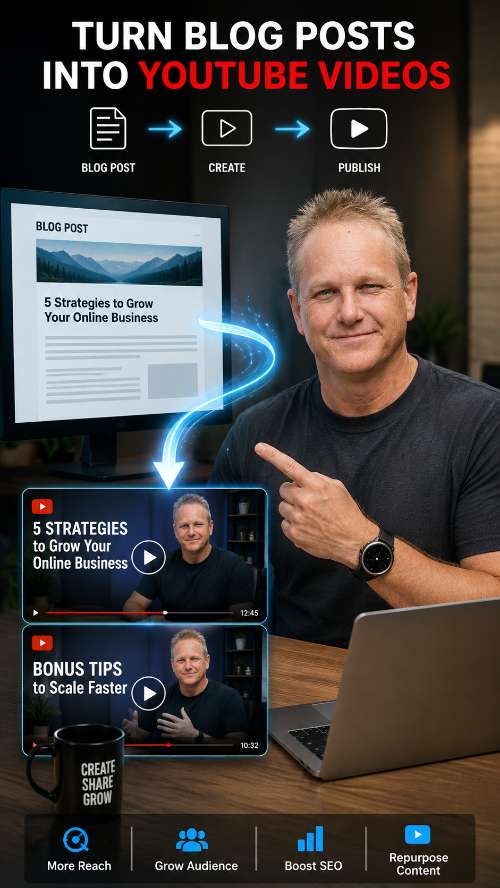
Shorts may get discovered through social platforms.
When the ideas connect, your content has more than one chance to reach the right person.
Example SEO Content Plan
Examples make this much easier to understand.
Let’s use a simple example topic:
“Free QR Code Generator”
At first, that sounds like one page.
But with proper planning, it can become a full content cluster.
Main Page Idea
The main page could be:
“Free QR Code Generator with Logo, Image or Photo”
This page should satisfy tool intent.
People landing there want to create a QR code, customise it, and download it.
So the tool should appear near the top.
The page can also explain:
- how to use the QR code generator
- how to add a logo
- how to customise colours
- how to use QR codes for business
- how to download and test the QR code
- common QR code mistakes
- related QR code guides
The main page does not need to answer every possible QR code question in extreme detail.
It needs to give people the tool first, then explain enough to make the page useful.
Supporting Blog Post Ideas for the Cluster
The supporting posts might include:
- How to Make a QR Code for a Website
- How to Make a QR Code for a PDF
- How to Add a Logo to a QR Code
- Static vs Dynamic QR Codes
- How to Track QR Code Scans for Free
- Best Ways to Use QR Codes for Small Business
- How to Make a QR Code for a Google Form
- How to Use QR Codes on Flyers and Business Cards
Each post targets a different search intent.
The main tool page targets people who want the generator.
The supporting posts target people who need tutorials, examples, explanations, and use cases.
That creates a much stronger structure than one huge article trying to cover every QR code topic on the internet.
Example SEO Title
A strong SEO title for the main page might be:
“Free QR Code Generator with Logo, Image or Photo”
That title is clear because it tells readers exactly what the tool does.
It also naturally includes the main tool keyword and the main differentiator: adding a logo, image, or photo.
Example Meta Description
A clear meta description might be:
“Create a free QR code with a logo, image, or photo. Customise colours, add a border, and download your QR code instantly with no sign-up.”
This explains the benefit quickly.
It tells the reader what they can do, what features are included, and why the tool is easy to use.
Why This Becomes a Content Cluster
The QR code generator is the central page.
The supporting posts answer related questions.
That means the blog does not need to cram every QR code topic into one page.
Instead, each post can go deeper into a specific use case.
That creates a cleaner structure for readers and search engines.
The same logic applies to almost any niche.
You can build clusters around tools, products, services, tutorials, health topics, travel guides, software workflows, affiliate products, or content creator resources.
What Is an SEO Content Plan?
An SEO content plan is a structured roadmap for what to publish, which keywords each page should target, how your articles connect, and what role each piece of content plays.
It is not just a list of blog post ideas.
A real SEO content plan includes:
- your main topic
- your primary keyword
- related keyword angles
- search intent
- SEO title ideas
- meta description ideas
- supporting blog post ideas
- internal link opportunities
- publishing priority
- content format
- reader next step
- conversion goal
For example, imagine you want to build content around “blog content planning.”
A random approach might produce these posts:
- Blog Content Tips
- How to Blog Better
- My Blogging Strategy
- SEO for Bloggers
- Blog Ideas
Those titles may have some value, but they feel disconnected.
A planned approach would look more like this:
Main page:
- Free SEO Content Planner Tool for Bloggers & Content Creators
Supporting posts:
- What Is an SEO Content Plan?
- How to Use an SEO Content Planner to Build a 10-Post Blog Cluster
- How to Find Low-Competition Long-Tail Keywords for Blog Posts
- How to Turn One Keyword Into a Full Content Cluster
- How to Avoid Keyword Cannibalization on Your Blog
- How to Create an SEO Content Calendar for Your Blog
- SEO Content Brief Template: What to Include Before Writing
That structure is much stronger.
Each article has a purpose.
Each article supports the main topic.
Then each article can link to the others naturally.
An SEO content plan gives your blog direction before you start writing.
Why Random Blog Post Ideas Usually Fail
Random blog posts can still get lucky, but luck is not a strategy.
Most beginner blogs fail to gain traction because the content does not connect.
The site owner might publish consistently, but the posts do not build on each other.
Here are the most common problems.
The Keywords Are Too Broad
A beginner might target a keyword like:
“SEO”
That keyword is huge.
It could mean technical SEO, local SEO, ecommerce SEO, SEO tools, SEO jobs, SEO training, SEO agencies, SEO audits, or beginner SEO tips.
A smaller site usually needs more specific angles.
Better examples include:
- SEO content planning for beginners
- how to create a blog content cluster
- how to write SEO titles for blog posts
- Avoid keyword cannibalization How to
- how to plan 30 blog posts from one topic
Those are clearer.
They also give you a better chance of writing something useful.
The Posts Overlap Too Much
This is a big one.
A blogger might publish:
- SEO Content Planner Tool
- Best SEO Content Planner
- Free SEO Content Planning Tool
- Blog Content Planner Tool
- SEO Blog Planner Tool
Those could all end up targeting almost the same search intent.
Instead of helping the site, they may confuse search engines.
Which page should rank?
Which page is the main one?
and Which one gives the best answer?
A better approach is to make one strong page for the main tool keyword, then create supporting posts around different problems.
The Content Is Too Thin
Thin content does not always mean short content.
A long article can still feel thin if it repeats the same ideas without adding depth.
Good content usually includes:
- clear explanations
- examples
- practical steps
- mistakes to avoid
- internal links
- FAQs
- original perspective
- useful next steps
A strong blog post should leave the reader feeling like they understand the topic better than before.
There Are No Internal Links
If every post on your blog stands alone, you make it harder for readers and search engines to understand your site.
Internal links help connect related ideas.
For example, a post about SEO content briefs should probably link to:
- your SEO Content Planner Tool
- your keyword research guide
- the internal linking guide
- your content calendar guide
- your FAQ generator
That creates a better user journey.
It also helps prevent useful posts from becoming isolated pages with no clear connection to the rest of your site.
There Is No Clear Next Step
Every article should lead somewhere useful.
That does not always mean selling something.
The next step could be:
- use a free tool
- read a related guide
- download a checklist
- watch a tutorial
- join an email list
- compare options
- start planning a content cluster
If a reader finishes your article and thinks, “Now what?” you missed an opportunity.
📢 Shareable Insight
“A scattered map still looks busy. But without direction, every road becomes another dead end.”
👉 Click to Tweet
How Content Clusters Help Your Blog Grow
A content cluster helps organise your blog around a central topic.
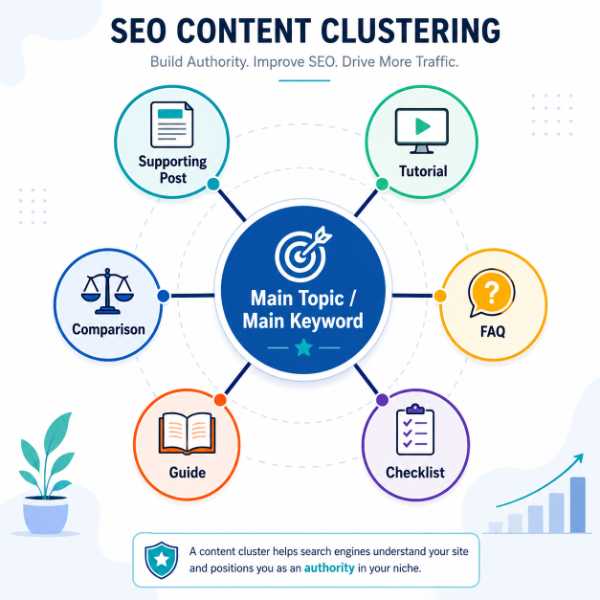
Instead of publishing disconnected articles, you build a group of related posts that support each other.
A simple content cluster includes:
- one main page
- several supporting posts
- internal links between related articles
- a clear topic structure
- different search intents
- a reason for readers to keep exploring
Think of the main page as the hub.
The supporting posts act like spokes around that hub.
For example, this page is the hub for your SEO content planning workflow.
Supporting posts could include:
- What Is an SEO Content Plan?
- How to Use an SEO Content Planner to Build a 10-Post Blog Cluster
- Turn One Keyword Into a Full Content Cluster
- How to Avoid Keyword Cannibalization
- SEO Content Brief Template
- How to Create an SEO Content Calendar
Each support post goes deeper into one part of the planning process.
That gives the main page more context.
It also gives readers more useful information.
Content Clusters Help Readers
Readers do not always arrive at your site through the main page.
Someone might find your article about keyword cannibalization first.
Another person might find your content brief template.
Another person might search for how to create a content calendar.
If those posts link back to the planner, each one can send visitors toward the main tool page.
That is how supporting content can feed your hub.
It gives readers a natural pathway through your site instead of forcing them to figure everything out alone.
Content Clusters Help Search Engines
Search engines need to understand what your site is about.
If you publish one article about SEO, one article about travel, one article about recipes, one article about crypto, and one article about fitness, your site may look scattered.
But if you publish a group of connected articles around SEO content planning, the topic becomes clearer.
Internal links help reinforce those connections.
That does not guarantee rankings, but it gives your site a cleaner structure.
Content Clusters Help You Plan Future Posts
A cluster also makes content creation easier.
Once you know the main topic, you can brainstorm related angles:
- beginner questions
- tutorials
- mistakes
- comparisons
- tools
- templates
- case studies
- examples
- checklists
- advanced tips
That gives you a backlog of useful ideas instead of forcing you to invent something from scratch every week.
It also helps you avoid creating the same article five different ways.
How to Avoid Keyword Cannibalization When Planning Blog Content
Keyword cannibalization happens when two or more pages on your site target the same keyword or the same search intent.
In plain English, your pages start competing with each other.
This can happen when you publish several articles that look different on the surface but answer the same basic search.
For example:
- Free SEO Content Planner Tool
- Best Free SEO Content Planner Tool
- SEO Content Planner Tool for Bloggers
- Blog SEO Content Planner Tool
- SEO Content Planning Tool Free
Those could all compete for similar searches.
That does not mean you can never use similar phrases across your site.
It means each page needs a different job.
Give Every Page a Clear Role
Before publishing a new article, ask:
- What is the main keyword?
- What is the search intent?
- Then what question does this page answer?
- Is this different from a page I already have?
- Should this be a separate article or a section inside an existing post?
- Which page should be the main hub?
- Which page should support the hub?
This simple check can prevent a lot of future mess.
Separate Similar Topics by Intent
Search intent is the reason behind the search.
For example:
“SEO content planner tool”
The person probably wants a tool.
“what is an SEO content plan”
The person wants an explanation.
“how to create an SEO content calendar”
The person wants a planning workflow.
“SEO content brief template”
The person wants a template.
“how to avoid keyword cannibalization”
The person wants to fix or prevent a specific SEO problem.
Those can all support the same cluster because they target different intent.
Do Not Turn Every Keyword Variation Into a New Post
Keyword tools and AI tools can generate endless variations.
That does not mean every variation deserves its own page.
Sometimes, several keyword variations should live inside one strong article.
For example, one article about “SEO content plan” could naturally mention:
- SEO content planning
- blog content plan
- content strategy plan
- SEO publishing plan
- content roadmap
You do not need separate posts for every tiny phrase.
Use Supporting Posts to Strengthen the Main Page
Your supporting posts should help your main page.
They should not compete with it.
For this page, the main keyword is “SEO content planner tool.”
So the supporting articles should target related angles like:
- what is an SEO content plan
- how to build a content cluster
- how to map keywords to blog posts
- Create a content calendar
- how to write SEO titles
- how to write meta descriptions
That gives your cluster depth without creating duplicate pages.
How to Turn the Tool Output Into Real Blog Posts
The tool can help you create ideas, but the real value comes from what you do next.
A content plan only becomes useful when you turn it into real articles, videos, internal links, and publishing actions.
Here is a simple workflow.
Choose Your Main Page First
Start by choosing the main page for the cluster.
This page should usually target the broadest or most valuable search intent.
Examples:
- a tool page
- a product review
- a beginner guide
- a comparison page
- a service page
- a category hub
- a pillar article
For example, if your topic is “image compression,” your main page might be a free image compressor tool.
Supporting posts could include:
- how to compress images for a blog
- JPEG vs WebP for websites
- how to reduce image file size without losing quality
- image compression for WordPress
- best image size for blog posts
- how image size affects page speed
The main page gives people the tool.
The supporting posts teach them how and why to use it.
Pick Supporting Posts by Search Intent
Next, group ideas by intent.
A good content cluster usually includes a mix of:
- beginner education
- step-by-step tutorials
- templates
- checklists
- mistakes posts
- comparisons
- examples
- FAQs
- case studies
- supporting tools
You do not need every type for every cluster.
The right mix depends on the topic.
For a free tool page, tutorials and use cases often work well.
A product review, comparisons and buyer guides may work better.
For a beginner topic, definitions, examples, and checklists may be more useful.
Create a Basic Content Brief
Before writing each post, create a simple brief.
Your brief should include:
- working title
- target keyword
- search intent
- reader problem
- main sections
- examples to include
- FAQs
- internal links
- external references if needed
- CTA
- related tools
- image ideas
- video angle
This prevents your article from drifting.
A brief also helps if you use AI to draft content because your prompt becomes much more specific.
Instead of asking AI for a generic post, you can ask for a post that follows a clear structure and supports a specific content cluster.
Publish in a Logical Order
A strong cluster usually works best when you publish in a sensible order.
For example:
- Publish the main tool or pillar page.
- Publish the beginner education article.
- Publish the tutorial.
- Publish the core strategy article.
- Publish the problem-solving post.
- Publish the template or checklist.
- Publish the comparison post.
- Add internal links across the cluster.
- Create YouTube videos or shorts from the best articles.
- Refresh the main page with links to the published guides.
You do not have to publish everything at once.
A cluster can grow over time.
What matters is that every article has a purpose.
Free SEO Tools That Work Well With This Planner
This SEO content planner is only one part of the workflow.
After you generate your ideas, you can use other free tools to turn the plan into a finished content system.
Internal Linking Tool
After you write a blog post, use an internal linking tool to find natural places to add links to related content.
Internal links help readers discover more of your site.
They also help connect your content cluster.
For example, if you write a post about content clusters, you might add internal links to:
- SEO Content Planner Tool
- Internal Linking Tool
- Keyword Cannibalization Guide
- Content Calendar Guide
- SEO Content Brief Template
FAQ Generator
FAQs can help you answer related questions near the end of a post.
A good FAQ section can improve the usefulness of your article because it covers questions that did not fit naturally into the main sections.
For example, a post about SEO content planning might include FAQs like:
- What is an SEO content plan?
- How many blog posts should be in a content cluster?
- Can I use AI to plan blog content?
- How do I avoid duplicate blog topics?
- Do I need paid SEO tools?
Click-to-Tweet Generator
Shareable quotes can make your content easier to promote.
You can pull strong lines from your article and turn them into social snippets.
For example:
“Random blog posts create random results.”
That line could become a tweet, image quote, short video hook, or email subject idea.
See Tool HERE
Backlink Opportunity Finder
After publishing your content, you can use a backlink opportunity tool to find realistic sites that might link to your page.
This is especially useful for free tools, templates, and helpful resources.
For example, if you publish a free QR code generator, you can look for:
- resource pages
- teacher technology guides
- small business tool lists
- blog posts mentioning QR tools
- outdated resource links
- free tool directories
Image Compressor
If your blog posts include featured images, screenshots, examples, or tutorial graphics, compressing images can help keep your pages lighter.
A browser-based image compressor can help reduce image file size before uploading to WordPress.
That can be useful when you are creating tutorial posts with lots of screenshots or featured images.
Common SEO Content Planning Mistakes
Even with a tool, you still need to make smart decisions.
A planner can organise ideas, but you still need to choose the right direction.
Here are the most common mistakes to avoid.
Choosing Keywords That Are Too Broad
Broad keywords look attractive because they seem important.
But they are often too competitive and too vague.
Examples of broad keywords include:
- SEO
- blogging
- marketing
- health
- fitness
- travel
- business
Better keyword angles are more specific:
- SEO content planning for beginner bloggers
- how to create a blog content cluster
- how to write SEO titles for blog posts
- how to plan blog content for affiliate marketing
- how to avoid keyword cannibalization
As a result, specific topics usually lead to better content because you know exactly what the reader wants, why they are searching, and what problem the article needs to solve.
📢 Shareable Insight
“Choosing a broad keyword is like giving someone directions by saying, “Go over there.” If the destination is vague, the content will be vague too.”
👉 Click to Tweet
Writing Multiple Posts With the Same Intent
This mistake creates content overlap.
For example, if you already have a page targeting “free SEO content planner tool,” you probably do not need another post titled “Best Free SEO Content Planner Tool for Bloggers” unless the intent is clearly different.
A better support article would be:
“How to Use an SEO Content Planner to Build a 10-Post Blog Cluster”
That article can link back to the tool without competing with it directly.
Publishing Without Internal Links
Many bloggers publish a post and then move on.
That is a mistake.
After publishing, ask:
- What older posts should link to this new post?
- What should this new post link to?
- Does this post support a pillar page?
- Does this post need a contextual link from a related article?
- Should this post link to a tool or template?
- Are there any natural CTA opportunities?
Internal linking should be part of your publishing process, not an afterthought.
Ignoring the Reader’s Next Step
A blog post should help the reader move forward.
After someone reads your article, what should they do?
Possible next steps include:
- use the free tool
- read the next guide
- download a template
- watch a video
- create a content brief
- plan internal links
- compare options
- join your email list
The next step should match the article.
A beginner guide might send readers to the planner.
A content brief article might send readers to a template.
An internal linking article might send readers to your internal linking tool.
Relying on AI Without Strategy
AI can help you write faster, but it can also help you create a lot of average content very quickly.
That is why strategy still matters. Before you ask AI to write a blog post, you need to know what the article should target, why the reader is searching, and how the post fits into your wider content plan.
Before using AI to write a post, you should know:
- what keyword you are targeting
- what search intent you are answering
- what examples you want to include
- what internal links you need
- what the article should do for your site
- what makes your version more useful than a generic article
AI is more useful when you give it a strong plan.
That is why content planning comes first.
Trying to Build Everything at Once
You do not need to publish 30 posts immediately.
Start with the most important pieces.
A simple first cluster might include:
- the main tool or pillar page
- a beginner guide
- a step-by-step tutorial
- a keyword research guide
- a content cluster guide
- a cannibalization guide
That is enough to create a strong foundation.
You can add more posts later.
The goal is not to publish as much as possible. The goal is to publish useful content that fits together.

Frequently Asked Questions
What is an SEO content planner tool?
An SEO content planner tool helps you organise keyword ideas, SEO titles, meta descriptions, supporting article ideas, content clusters, and publishing direction before you start writing.
As a result, you can create a clearer plan before you publish. Instead of writing random blog posts with no structure, you can map out what each article should target, how each post connects, and where it fits inside your wider SEO content strategy.
Is this SEO content planner free?
Yes. This SEO content planner is free to use.
It is designed for bloggers, content creators, small website owners, affiliate marketers, and beginners who want a simple way to plan SEO content without paying for expensive software.
Do I need paid SEO tools to use this?
No. Paid SEO tools can help with search volume, keyword difficulty, backlink data, competitor research, and deeper analysis.
However, you can still create a useful content plan with free tools, search intent research, your own knowledge, and a clear content structure.
In other words, paid SEO software can help, but it is not the only way to plan smarter content. Instead, this planner is designed to help you think through your topic, organize your ideas, and create a clearer strategy before you start writing.
Can this tool help me create a content cluster?
Yes. You can use the tool to turn one topic into a main page idea and several supporting blog post ideas.
For example, one topic might become:
- a pillar page
- a beginner guide
- a tutorial
- a checklist
- a comparison post
- a template
- an FAQ article
- a problem-solving post
That structure can help you build topical depth around your main subject.
Can I use this tool for YouTube content planning?
Yes. You can use the same topic ideas for blog posts, YouTube videos, Shorts, social posts, and email content.
For example, one planned blog post could also become:
- a YouTube tutorial
- a short video series
- a newsletter
- a social media thread
- a quote graphic
- a related FAQ post
This is useful if you want your blog and YouTube channel to support each other.
How do I avoid keyword cannibalization?
Give every page a clear job.
One page should target the main keyword or main search intent. Supporting posts should target related questions, tutorials, examples, comparisons, templates, or problems.
For example, this page targets the free SEO content planner tool angle.
A supporting post about keyword cannibalization should not try to rank for the same tool keyword. It should explain the cannibalization problem and link back to this planner as a useful next step.
What should I do after generating my SEO content plan?
After generating your plan, choose your strongest main page idea first.
Then:
- Pick the best supporting posts.
- Remove duplicate or overlapping ideas.
- Choose one target keyword or angle for each post.
- Create a simple content brief.
- Write the first article.
- Add internal links.
- Publish in a logical order.
- Update your pillar page as supporting guides go live.
- Repurpose the best content into videos or social posts.
The tool gives you the starting point. The real value comes from turning the output into a structured publishing workflow.
How many supporting posts should a content cluster have?
There is no perfect number.
A small cluster might have 5 to 8 supporting posts.
A larger cluster might have 20 or more over time.
The better question is:
“How many genuinely useful angles does this topic deserve?”
Do not create extra posts just to hit a number.
Create supporting posts when they answer a different question, solve a different problem, or serve a different search intent.
Should every blog post link back to the main pillar page?
If the supporting post is part of the same cluster, yes, it should usually link back to the main pillar page.
That link should feel natural.
For example, a post about creating a content calendar could link back to this planner with anchor text like:
- plan your SEO content first
- use the free SEO content planner
- create your content cluster
- build your blog content plan
Avoid forcing the same exact anchor text into every article.
Can I use this planner with AI writing tools?
Yes.
In fact, this planner can make AI writing tools more useful because it gives you a clearer strategy before you generate the article.
Instead of asking AI to “write a blog post about blogging,” you can give it:
- a target keyword
- a title
- a search intent
- supporting sections
- FAQs
- internal links
- examples
- CTA direction
That usually produces a much better draft.
Start Planning Your Next SEO Content Cluster
You do not need another random blog post idea.
You need a clear plan.
Use the free SEO content planner tool above to turn your next topic, keyword, niche, product, or video idea into a practical publishing roadmap.
Use the Free SEO Content Planner Again
Scroll back up to the tool and enter your next topic.
Start with one idea.
Generate your keyword angles.
Choose your main page.
Pick supporting articles that answer different search intents.
Create your titles and meta descriptions.
Then build the internal links that connect everything together.
That is how you move from scattered content to a structured SEO content cluster.
Bookmark the Free Tools Page
You can also bookmark the main free tools page so you can come back whenever you need help planning, writing, optimising, or promoting your next blog post.
Go HERE and Bookmark Tools Page
Turn Your Plan Into Your Next Blog Post
Do not just write the next blog post because you feel like you need to publish something.
Plan the cluster first.
Then every article has a job.


