
Free Broken Link Checker for Resource Pages and Outreach
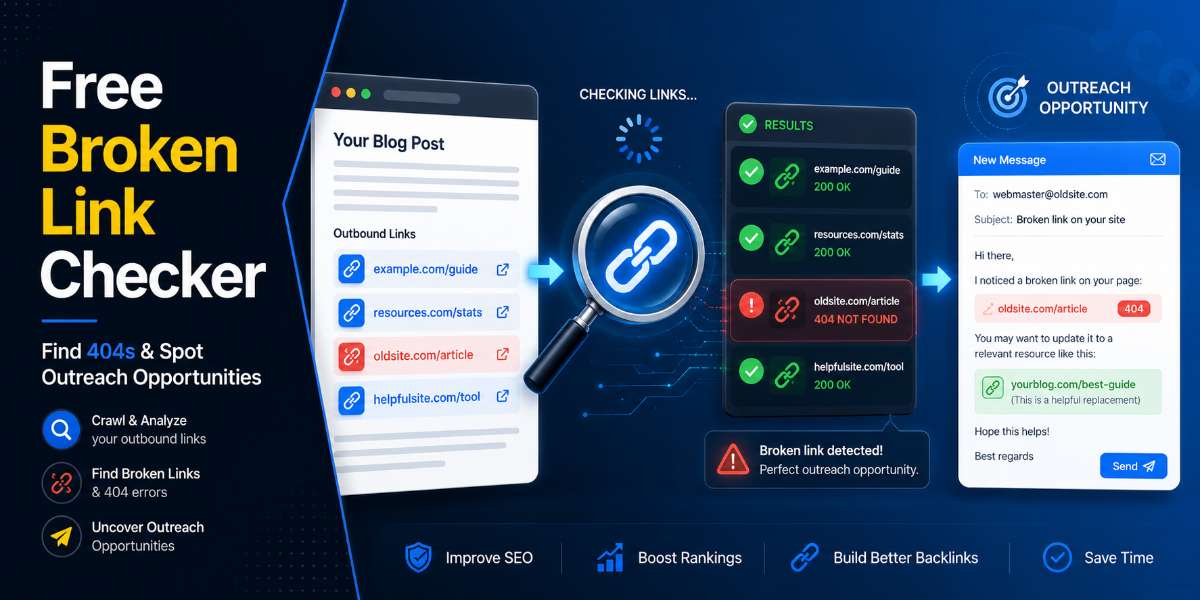
Use this free broken link checker to scan a resource page, tools list, or useful links page for broken external links. Paste in one page URL, click the button, and the tool will check the outbound links so you can spot possible broken link outreach opportunities.

Free SEO Tool
Broken Link Checker
Find broken outbound links on resource pages, roundup posts, and old guides before you pitch your replacement resource.
Step 1
Check Outbound Links from a Resource Page
Paste one resource page, roundup post, or old guide URL. This version extracts external links and checks the first capped batch for possible broken links.
How to use the results
Manual Review Still Matters
Strong candidates
- 404 and 410 links are the clearest broken-link opportunities.
- Open the source page and confirm the broken link appears in useful body content.
- Only pitch your page if it genuinely fits the original context.
Be careful
- 403, 429, blocked, timeout, and server errors are uncertain.
- Redirects are not always bad.
- Check uncertain links manually before using them in outreach.

Watch Broken Link Checker Instructional Video

Free Broken Link Checker for Resource Pages and Outreach
Broken links are everywhere.
Old resource pages have them. Tool roundups have them. “Useful links” pages have them. Blog posts from five years ago have them. Even well-maintained websites can end up linking to pages that no longer exist.
That creates a problem for website owners, but it can also create an opportunity for bloggers, creators, marketers, and small business owners who are trying to build backlinks the right way.
A broken link is not just a dead URL. It is a small gap in someone’s content. If you can find that gap, point it out politely, and suggest a genuinely useful replacement, you have a much better outreach angle than simply asking someone to link to your website.
That is where this free Broken Link Checker fits in.
It helps you check one page at a time, look for broken external links, and use those findings as part of a simple backlink outreach workflow.
This is not designed to be a giant technical SEO crawler. It is a focused tool for manual backlink research, especially when you are checking resource pages, tool lists, roundups, and pages that already link to helpful external resources.
What Is a Broken Link Checker?
A broken link checker is a tool that scans a webpage and tests the links on that page to see whether they still work.
If a link points to a page that has disappeared, moved, expired, or returned an error, the link may be broken. Common broken link errors include 404 pages, removed content, expired domains, and pages that no longer load correctly.
This free Broken Link Checker focuses on a practical use case: checking external links on individual pages.
That makes it useful for pages such as:
- Resource pages
- Recommended tools pages
- “Useful links” pages
- Industry directories
- Blogging resource lists
- SEO resource pages
- Old roundups
- Educational link collections
- Niche recommendation pages
The goal is simple. You paste in a page URL, check the external links, and look for broken links that may create a genuine outreach opportunity.
Why Broken Links Matter
Broken links hurt the user experience.
If someone clicks a recommended resource and lands on a dead page, it creates friction. It makes the original page feel outdated. It can also reduce trust because the reader expected a helpful recommendation and got an error instead.
Website owners do not want dead links sitting inside their content. However, most site owners do not have time to check every old article, resource list, and external recommendation manually.
That is why broken link outreach can work.
You are not starting the conversation by asking for a favor. You are starting by helping the site owner fix something on their page.
That does not mean you are guaranteed a backlink. You are not. But it gives you a much better reason to reach out than a generic “please link to my article” email.
Good broken link outreach starts with being useful.
How Broken Link Building Works
Broken link building is a link building method where you find broken links on other websites and suggest a relevant replacement.
The basic process looks like this:
- Find a relevant page that links to external resources.
- Check that page for broken links.
- Review the broken links and see whether your content or tool could genuinely replace one of them.
- Contact the website owner.
- Mention the broken link.
- Suggest your page only if it fits naturally.
The key part is relevance.
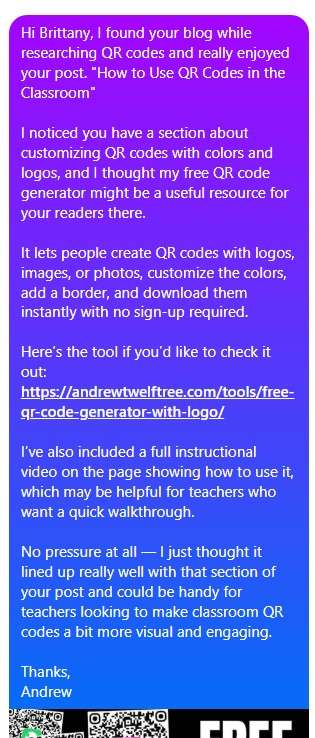
Do not find a random broken link on a random page and then pitch an unrelated blog post. That is lazy outreach, and it usually gets ignored.
Instead, look for pages where your content, tool, guide, tutorial, or resource genuinely helps the reader.
For example, if a marketing resource page links to an old dead QR code generator, and you have a working free QR code generator, that could make sense.
If a blogging tools page links to a broken internal linking tool, and you have a free internal linking tool for blog posts, that could make sense.
If a resource page links to a dead SEO checklist and you try to pitch a completely unrelated health article, that does not make sense.
Relevance is what turns a broken link into a real backlink opportunity.
📢 Shareable Insight
“Broken links create friction for readers, but they also create an opportunity to reach out, be helpful, and earn backlinks the right way.”
👉 Click to Tweet
What This Free Broken Link Checker Does
This free Broken Link Checker helps you check a single page for broken external links.
Instead of crawling an entire website or overwhelming you with technical SEO data, it keeps the workflow simple.
You paste in the page you want to check, click the button, and review the results.
The tool can help you:
- Check one resource page at a time
- Find external links on that page
- Spot links that appear broken
- Separate broken, working, and uncertain results
- Review backlink outreach opportunities
- Copy a simple broken link outreach starter
- Use broken links as part of a wider backlink workflow
This makes the tool especially useful when you are doing manual outreach.
You might already have a list of resource pages, tool pages, or roundup articles. Instead of checking every link by hand, you can paste each page into the tool and quickly see whether any external links look broken.
Then you can decide whether the page is worth contacting.
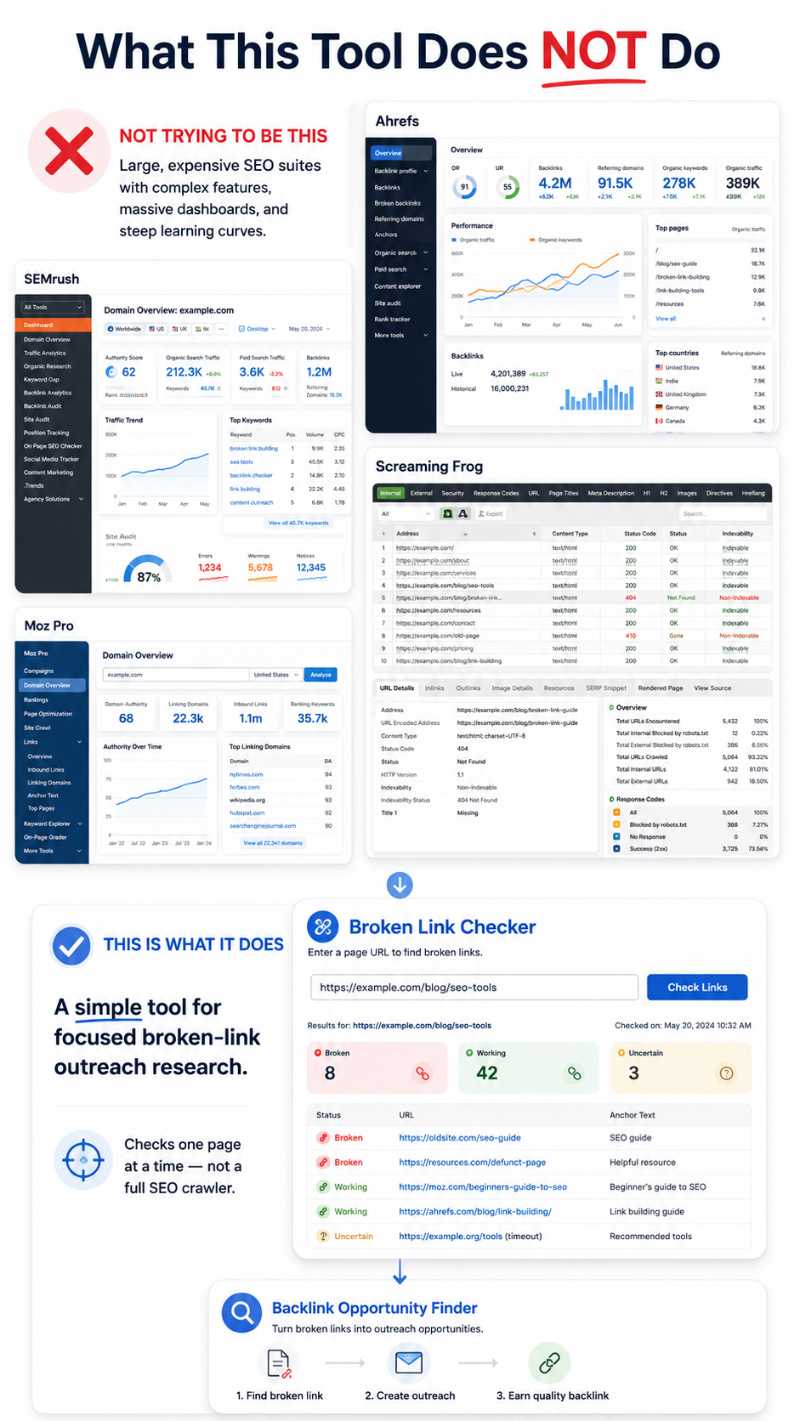
What This Tool Does Not Do
This tool is intentionally simple.
That is a good thing.
It is not trying to replace a full technical SEO audit tool. It is not trying to crawl thousands of pages. Nor is It designed for bulk scraping, mass automation, or spammy backlink campaigns.
This tool does not:
- Crawl an entire website
- Check thousands of pages at once
- Replace paid SEO crawlers
- Guarantee every link status is perfect
- Automatically contact website owners
- Guarantee backlinks
- Check private, blocked, or login-only pages reliably
- Tell you whether your replacement page deserves the link
That last point matters.
A broken link checker can help you find a possible opportunity, but it cannot decide whether your page is good enough, relevant enough, or useful enough.
That part still needs human judgment.
If the broken link has nothing to do with your content, move on. If your page genuinely improves the resource, then it may be worth a polite outreach email.
How to Use the Free Broken Link Checker
Using the tool is simple. There is a video at the top of the post that gives a couple of examples… But seriously, not hard lol…
Start by finding a page that already links to external resources. This could be a resource page, tools page, links page, roundup, or old blog post with several outbound links.
Then copy the URL of that page and paste it into the Broken Link Checker.
Click the check button and let the tool scan the external links.
When the results appear, review them carefully. You may see links marked as broken, working, or uncertain.
A broken result means the tool found a likely problem with that link.
A working result means the link appears to load correctly.
An uncertain result means the tool could not confidently confirm the status. This can happen because some websites block automated checks, use redirects, or respond in unusual ways.
Before you contact anyone, manually open the broken link yourself. This extra step helps you avoid sending weak or incorrect outreach emails.
If the broken link is real, and your page makes sense as a replacement, use the outreach starter as a base and personalize it.
Best Types of Pages to Check
You will get better results if you check the right types of pages.
The best pages are usually pages that already link out to other helpful websites.
Good examples include:
- Resource pages
- Useful links pages
- Best tools lists
- Recommended software pages
- Blogging resource pages
- SEO tools pages
- Marketing resource pages
- Small business resource pages
- Educational resource pages
- Niche roundups
- Old “best of” articles
- Industry directories
These pages make sense because the website owner has already shown they are willing to link to external resources.
Poor targets include:
- Social media profiles
- Search result pages
- Coupon pages
- Spam directories
- Thin AI-generated pages
- Low-quality scraped pages
- Random posts with no resource intent
- Pages that do not link to external resources
The goal is not to check the entire internet.
The goal is to find relevant pages where a helpful replacement link would make sense.
Broken Link Outreach Example
Here is a simple outreach message you can adapt if you find a real broken link.
Subject: Broken link on your resources page
Hi [Name],
I was reading your page on [topic] and noticed one of the links under [section] appears to be broken:
[broken URL]
Just thought I’d let you know.
I also have a related resource here that may be useful if you are updating the page:
[your URL]
Either way, hope that helps.
Thanks,
[Your Name]
This type of message works because it is short, helpful, and low-pressure.
You are not begging for a backlink. You are pointing out a problem and offering a possible fix.
BUT You can also remove the replacement suggestion from the first email if you want a softer approach. In some cases, simply telling someone about the broken link first can start a better conversation.
How This Tool Fits Into the Backlink Opportunity Finder Workflow
The Broken Link Checker works best as one step inside a bigger backlink workflow.
Here is the simple process:
- Use the Free Backlink Opportunity Finder to discover resource pages and outreach prospects.
- Copy promising page URLs from your prospect list.
- Paste each page into the Broken Link Checker.
- Review the broken, working, and uncertain external links.
- Manually confirm any promising broken links.
- Send a short, helpful outreach email if your page is a relevant replacement.
- Track your outreach in the Backlink Opportunity Tracker.
This keeps the process organized.
The Backlink Opportunity Finder helps you find pages that may be worth checking. The Broken Link Checker helps you inspect those pages for dead external links. The tracker helps you remember who you contacted, what you found, and whether you need to follow up.
That gives you a simple backlink workflow without needing paid SEO tools.
You still need patience. You still need good content. And You still need to contact the right people. However, this workflow gives you a practical way to find realistic opportunities instead of randomly guessing.
Tips for Better Broken Link Outreach
Broken link outreach works best when you treat it like helpful communication, not a link begging campaign.
Here are a few tips:
Check the broken link manually before sending an email. Do not rely only on the tool result.
Only suggest your page when it genuinely fits. If your page is not a relevant replacement, do not pitch it.
Keep your email short. Site owners are busy. A clear, helpful message usually works better than a long pitch.
Mention the broken link first. That is the reason for your email.
Suggest your replacement second. Do not lead with “please link to me.”
Personalize the message. Mention the page, section, or topic so the person knows you actually looked at their content.
Avoid mass sending the same lazy template. People can spot that immediately.
Follow up once if the opportunity is strong, but do not keep chasing people who do not reply.
Track your outreach so you do not contact the same website again by mistake.
Most importantly, make sure your page deserves the link.
If your content is thin, generic, or only created to grab backlinks, the outreach will feel weak. If your page is genuinely useful, the pitch becomes much stronger.
📢 Shareable Insight
“The strongest broken link outreach does not feel like a backlink request. It feels like a helpful fix for a real problem.”
👉 Click to Tweet
Final Thoughts: Use Broken Links as a Helpful Outreach Angle
Broken link building is not about blasting random website owners with lazy backlink requests.
It works best when you find a real problem, point it out politely, and only suggest your page when it genuinely helps replace the missing resource.
That is exactly where this free Broken Link Checker fits in.
Instead of crawling thousands of pages or overwhelming you with technical SEO data, it helps you check one resource page at a time, spot broken external links, and turn the best opportunities into simple outreach messages.
For the best results, use it alongside the Free Backlink Opportunity Finder.
First, find relevant resource pages. Then, check them for broken external links. Finally, track your outreach so you know who you contacted, what you found, and which opportunities are worth following up.
Broken link outreach will not guarantee backlinks. Nothing does.
But it gives you a practical, helpful reason to contact website owners. And when your replacement page genuinely improves their content, that can lead to better conversations, better relationships, and better backlink opportunities.
👉 Try the Free Broken Link Checker, then use it as part of your wider backlink workflow to find, check, pitch, and track realistic backlink opportunities without paid SEO tools.
Frequently Asked Questions
What is a broken link checker used for?
A broken link checker scans a webpage and tests the links on that page to see whether they still work. In this case, the tool is designed to help you check external links on one resource page at a time, so you can spot broken links that may create useful outreach opportunities.
Why should I scan resource pages for broken links?
Resource pages are useful because they already link out to helpful tools, guides, websites, and references. If one of those external links is broken, you may have a practical reason to contact the site owner, let them know about the issue, and suggest a relevant replacement if your page genuinely fits.
How does broken link building work?
Broken link building involves finding a relevant page, checking it for broken outbound links, confirming the issue, and then contacting the site owner with a helpful note. The best outreach mentions the broken link first and only suggests your own page if it is a genuinely useful replacement.
Does this tool check external links?
Yes. This Broken Link Checker is focused on external links, which makes it useful for checking resource pages, tool lists, useful links pages, old roundups, and recommended reading pages that link out to other websites.
Can I check an entire website with this tool?
No. This tool is designed to check one page at a time. That keeps the workflow simple, focused, and practical for manual backlink outreach instead of turning it into a bulk website crawler or full technical SEO audit tool.
Why does this tool check one resource page at a time?
Checking one page at a time helps keep the process cleaner and more useful. Instead of generating a huge messy report, you can inspect one relevant resource page, review the broken links, and decide whether there is a realistic outreach opportunity worth pursuing.
What makes a broken link worth pursuing?
A broken link is worth pursuing when the page is relevant, the website looks legitimate, and your content or tool would make sense as a replacement. A random broken link on an unrelated page is usually not worth your time. The best opportunities are closely connected to your topic.
Should I only look for 404 errors?
No. A 404 error is one of the clearest signs of a broken link, but it is not the only issue worth checking. Some links may redirect to irrelevant pages, lead to expired domains, show server errors, or no longer match the original topic. Always open promising results manually before doing outreach.
What does an uncertain result mean?
An uncertain result means the tool could not confidently confirm whether the link is broken or working. Some websites block automated checks, use unusual redirects, or respond in ways that make the result harder to verify. If a result is uncertain, check the link manually before contacting anyone.
What should I do after I find a broken link?
First, manually confirm that the link is actually broken. Then check whether your page is a relevant replacement. If it is, save the resource page URL, the broken URL, the anchor text, and the section where the link appears. Then send a short, helpful outreach message to the site owner.
What should a broken link outreach email include?
A good broken link outreach email should include the page where you found the broken link, the broken URL or anchor text, and a brief replacement suggestion if your page genuinely fits. Keep the message short, specific, and helpful. One polite follow-up is usually enough if you do not get a reply.
Can a broken link checker guarantee backlinks?
No. A broken link checker cannot guarantee backlinks. It can help you find possible outreach opportunities, but the result still depends on relevance, the quality of your page, timing, and whether the site owner decides to update their content.
Is this tool a replacement for paid SEO tools?
No. This is a simple free tool for focused manual checks. Paid SEO crawlers can scan entire websites and provide deeper technical reports, but this tool is built for quick broken link outreach research on individual resource pages.
What are the biggest mistakes people make with broken link building?
The biggest mistake is treating every broken link as an automatic backlink opportunity. Not every broken link is relevant or worth pursuing. Other common mistakes include pitching unrelated pages, sending long generic emails, failing to manually confirm the broken link, and using weak replacement content.


