
How to Track QR Code Scans for Free (No Subscription Required)

QR codes are a powerful way to drive traffic. However, one common question people ask is: can you track how many people scan your QR code?
The short answer is yes.
However, most QR code tools lock this feature behind paid plans. As a result, you’re often forced into a subscription just to see basic data.
Fortunately, there’s a way to track QR code scans for free using tools you likely already have access to.
Prefer to watch instead? This quick walkthrough shows simple ways to track QR code scans for free using tools like Bitly and Google Analytics.


📢 Shareable Insight
“If you’re not tracking QR code scans, you’re guessing which flyers, posters, menus, or campaigns are actually bringing in customers.”
👉 Click to Tweet
Can You Track QR Code Scans?
Technically, QR codes themselves do not track anything.
Instead, tracking happens through the link behind the QR code.
In other words, when someone scans your QR code, they are opening a URL. Therefore, if that URL is trackable, you can measure scans.
Method 1: Track QR Code Scans Using Bitly (Simple Method)
One of the easiest ways to track QR code scans is by using a link shortener like Bitly.
Here’s how it works:
Step 1: Create a Bitly link
Go to Bitly and paste your original URL (website, PDF, image, etc.).
Step 2: Copy the shortened link
Bitly will generate a shorter, trackable link.
Step 3: Create your QR code
Paste the Bitly link into your QR code generator.
Step 4: Track your clicks
Bitly automatically tracks how many people click your link.
As a result, every scan of your QR code is recorded as a click.
Method 2: Track QR Code Scans Using Google
If you want more detailed tracking, you can use Google Analytics.
However, instead of using a normal link, you’ll need to create a trackable link with labels attached to it.
These labels are called UTM parameters, but don’t worry — it’s much easier than it sounds.
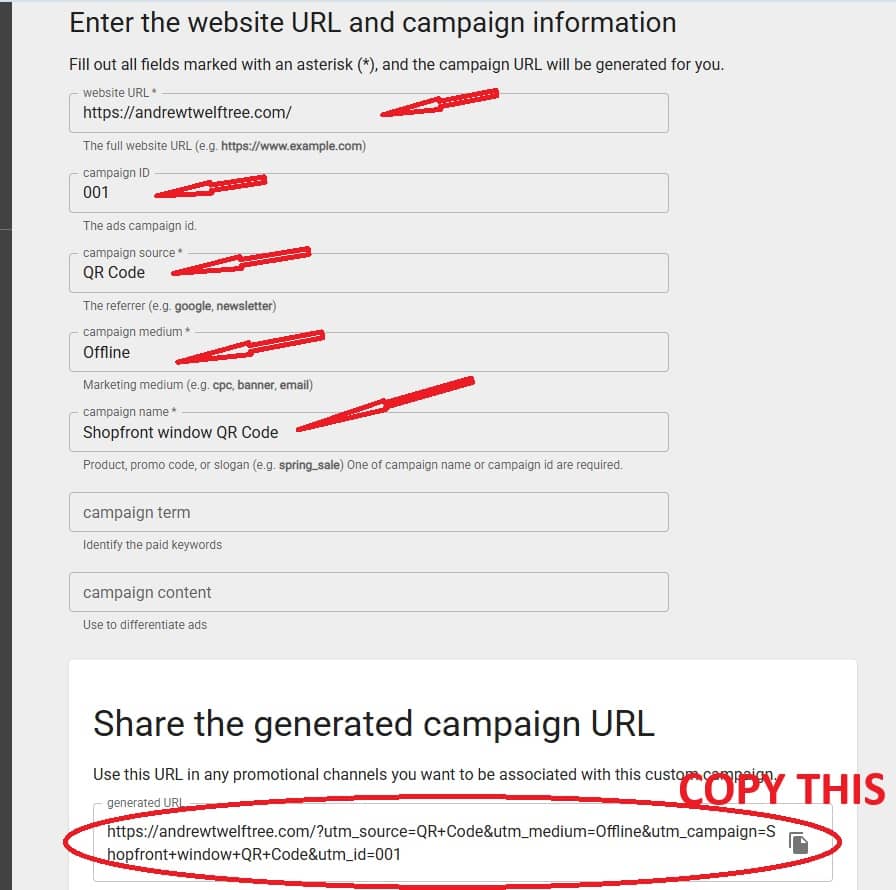
SStep 1: Create a tracked link (free)
To track your QR code scans, you need to create a special version of your link that includes tracking data.
👉 Use this free tool from Google:
https://ga-dev-tools.web.app/campaign-url-builder/
Once you’re on the page, fill in the fields like this:
- Website URL: your normal link
- Campaign Source: qr-code
- Campaign Medium: offline
- Campaign Name: something like flyer, poster, or business-card
As you fill it out, the tool will automatically generate a new link.
👉 This is your tracked link
Step 2: Copy and use the tracked link
Copy the full generated URL and paste it into your QR code generator:
Now, every scan of your QR code will be tracked inside Google Analytics.
Step 3: View your results
Inside Google Analytics, you’ll be able to see:
- Traffic from your QR codes
- Where users came from
- What they did after scanning
As a result, you get real insights without paying for expensive QR tools.
Why Most QR Code Tools Charge for Tracking
Many QR platforms use something called dynamic QR codes.
These work by routing your QR code through their servers. As a result, they can track scans, locations, and devices.
However, this comes with downsides:
- Monthly subscription fees
- QR codes can expire
- Your data is controlled by the platform
Free vs Paid QR Code Tracking
Here’s a simple breakdown:
Free method (recommended):
- Uses static QR codes
- Requires external tools (Bitly or Google Analytics)
- No expiry
- No ongoing cost
Paid tools:
- Built-in tracking dashboards
- Dynamic QR codes
- Subscription required
- Possible expiry or limits
Best Use Cases for QR Code Tracking
Tracking QR codes is especially useful if you want to:
- Measure marketing campaigns
- Track flyer or poster performance
- Monitor event engagement
- Test different locations or placements
For example, you could place different QR codes in multiple locations and compare results.
Tips for Better QR Code Tracking
To get accurate data, follow these tips:
Use clear naming conventions
Label your links so you know where traffic is coming from.
Keep your links consistent
Avoid changing URLs once printed.
Test before launch
Always scan your QR code and confirm tracking is working.
Use separate links for campaigns
This helps you compare performance more effectively.
Create Your QR Code (Free)
Once you have your trackable link ready, you can create your QR code instantly.
This allows you to generate QR codes without worrying about subscriptions or expiry.
Final Thoughts
Tracking QR code scans doesn’t need to be complicated or expensive.
In fact, by using tools like Bitly or Google Analytics, you can track performance for free.
As a result, you get valuable insights without being locked into paid platforms.
So, if you want to measure how your QR codes are performing, start with a simple tracking setup and build from there.
🔗 Related Guides
- How to Create a QR Code for a PDF (Free)
- How to Create a QR Code for an Image
- How to Track QR Code Scans for Free
- How Small business can use QR Codes


