
Someone Cloned My Facebook Account — What Do I Do?

How to Shut Down Fake Profiles, Protect Your Friends, and Stop Scammers Using Your Name
If you’re here because someone cloned my Facebook account is the exact sentence running through your head right now, you’re not alone — and you’re not crazy. It’s happening more often than ever, and the scumbags doing it know exactly what they’re doing. They steal your photos, copy your profile, mimic your follower count, block you instantly, and then start messaging your friends or posting on their timelines to push scams. It’s disgusting, it’s invasive, and it can seriously damage your credibility if you don’t act fast.
The good news? You can shut these impersonators down quickly if you know the right steps. Facebook won’t walk you through it, and most guides online are too soft or generic — so this article gives you the real, practical, no-bullshit process that actually works. You’ll learn how to report the fake profile, how to stop them posting on your timeline, how to verify whether a suspicious account is actually your friend, and how to protect your contacts from getting caught in the mess. Let’s get this handled.
Someone Cloned My Facebook Account — What Actually Happened
When someone clones your Facebook account, it’s not an accident. These scammers are deliberate. They grab your profile picture, steal your posts, replicate your details, and then manually type in your follower numbers to make it look legit — even though the account shows 0 followers and 0 following. And the first thing they do? They block you, just so you can’t find the fake version of yourself.
From there, they go straight to your friends, commenting on their posts, messaging them, or spamming timelines with crypto scams and god knows what else. It’s pathetic, it’s cowardly, and it absolutely undermines your credibility.
And honestly, it totally just pisses me off that people could stoop so low to do such a thing. Whatever happened to respect these days?
How to Spot a Cloned Facebook Account
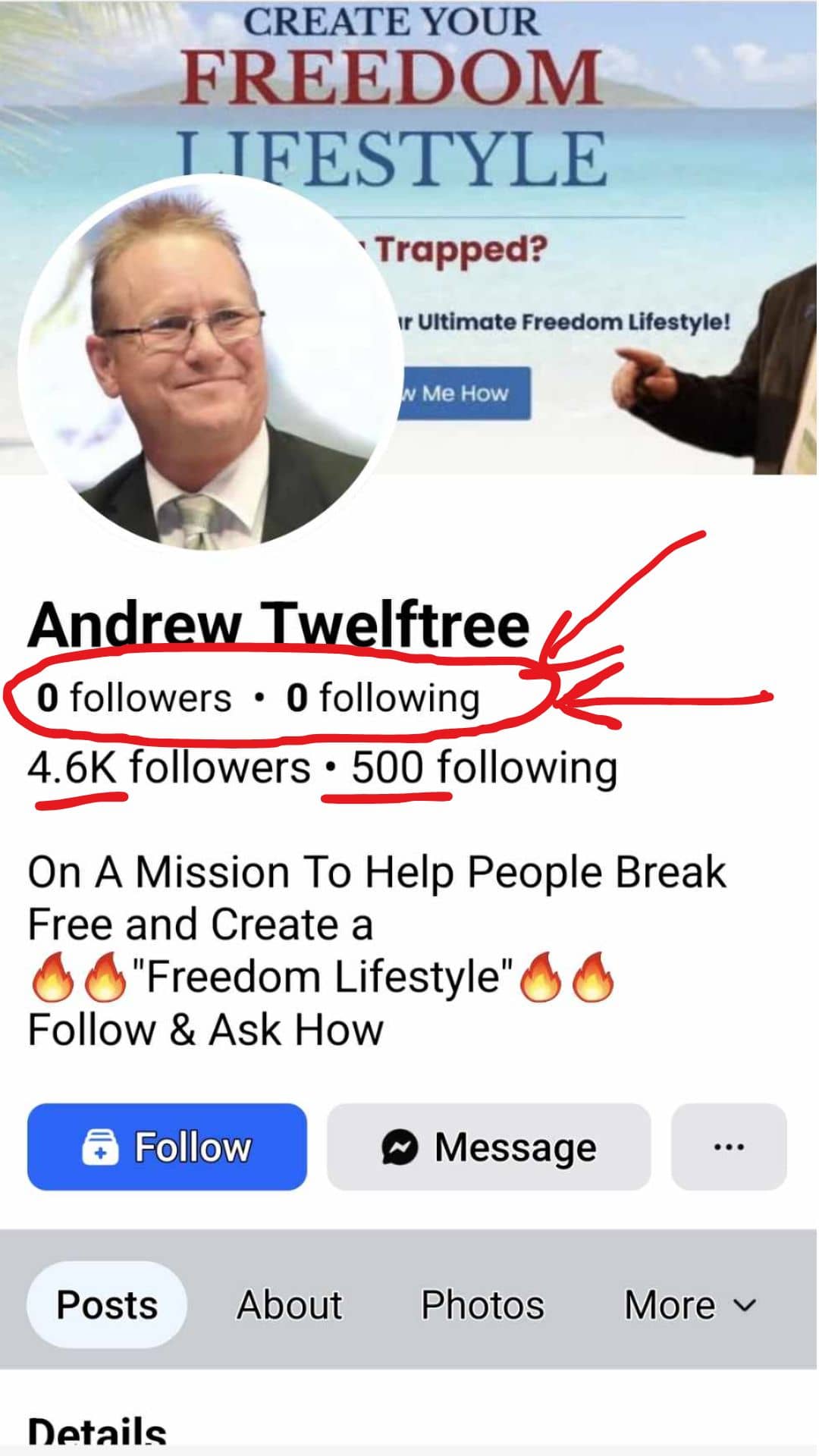
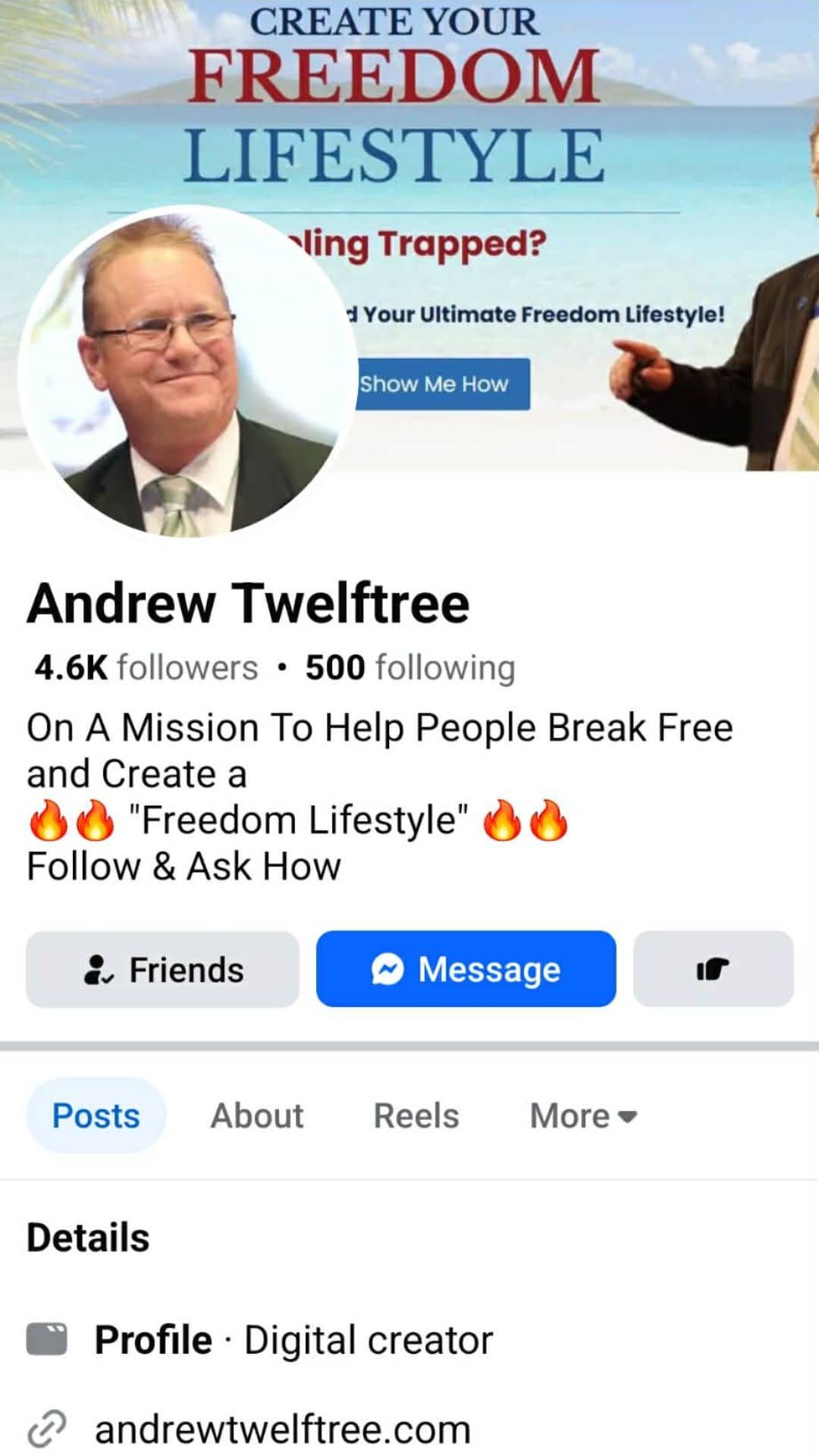
Fake profiles often have obvious red flags — once you know what to look for:
- The profile shows 0 followers / 0 following, yet they’ve typed fake numbers under the name.
- Recently created account.
- Identical name, profile photo, cover image.
- No real posts or history.
- Weird comments or messages promoting scams.
- Photos that look copied or recently uploaded all at once.
If you have screenshots of the fake profile, include them — the contrast is usually hilarious and infuriating at the same time.
📢 Shareable Insight
If some piece of shit scammer clones your Facebook account, don’t freeze—take control and shut it down fast.
👉 Click to Tweet
What to Do Immediately (Step-by-Step)
Here’s exactly what you and your friends should do the moment a clone appears.
Step 1 — Report the Fake Account
Go to the fake profile → Click Report → Select “Pretending to be someone I know” → Choose your real account.
Step 2 — Block the Fake Profile
This stops them from snooping, tagging, or interacting further.
Step 3 — Get Friends to Report It Too
Facebook acts much faster when 3–5 people send similar reports.
Step 4 — Verify Suspicious Accounts Using Messenger
If you’re unsure whether the profile is fake:
- Open Messenger.
- Look at your message history with the real person.
- If there’s history, that’s the real account.
- Send them the link to the suspicious profile so they can check it from their end (or a partner’s account if they’re blocked).
Scammers often block the real person, so sending them the link helps confirm whether it’s actually them.
Step 5 — Screenshot Everything
Just in case there’s further impersonation later.
Turn On Timeline Review (Stop Scammers Posting on Your Timeline)
Most people don’t realise this: if timeline review isn’t turned on, anyone can post on your timeline and tag 50 of your friends… and everyone sees it. Yes, scammers abuse this.
Turning on Timeline Review ensures:
- Nothing appears on your timeline without your approval.
- Scammers can’t blast posts pretending to be you.
- You stay in control of what the world sees.
How to Enable Timeline Review
Settings & Privacy → Profile & Tagging →
- Review posts you’re tagged in before they appear on your timeline → ON
- Review tags that people add to your posts → ON
A tiny inconvenience, but it stops a massive amount of damage.
Hide Your Friends List (Protect Your Network)
This one is big. If your friends list is public, scammers use it like a checklist. They go down the list and message every single person pretending to be you.
The solution? Hide your friends list.
Why This Works
- Scammers can’t see who you know.
- They can’t mass-message your network.
- They can’t post on your friends’ timelines pretending to be you.
- It forces them to try harder, slowing them down dramatically.
How to Hide Your Friends List
- Go to your Facebook profile.
- Click Friends.
- Click the three dots → Edit Privacy.
- Set Who can see your friends list → Only Me.
- Optionally also set Followers and Following visibility to Only Me or Friends.
If they can’t see your network, they can’t weaponize it.
Why All This Matters
Impersonation scams work because scammers piggyback off your credibility. They rely on your friends trusting your face, your name, and your reputation. When someone clones your account, it’s not just annoying — it’s an attempt to exploit your social circle.
Locking down your settings, reporting fakes quickly, and verifying suspicious accounts helps keep everyone safer. And it sends a clear message: you’re not an easy target. Someone Cloned My Facebook Account
📢 Shareable Insight
Facebook makes billions off your data—yet it takes YOU to warn your friends when your account gets cloned.
👉 Click to Tweet
OR (lol)
📢 Shareable Insight
If Meta cared about your identity, they’d make cloning harder than creating fake legs on a catfish.
👉 Click to Tweet
Final Call to Action
If you ever see a fake profile pretending to be me, report it immediately. And if you get a weird message from “me” about crypto, giveaways, or anything that feels off — it’s not me. Double-check through Messenger.
And hey, if you’d rather learn how to build something real online instead of falling for the garbage these scammers push, you can always check out the 7 Day Shift. For a deeper breakdown, you can read my full 7 Day Shift Review, or if you’re curious about the business model behind it, here’s Ghost Commerce Explained. It’s a simple, beginner-friendly way to start making money online without all the scammy nonsense. Totally optional — but worth a look.
If you ever need to confirm you’re talking to the real me, this is my actual profile — feel free to follow or connect here
Stay safe out there.


